Quick Estimate
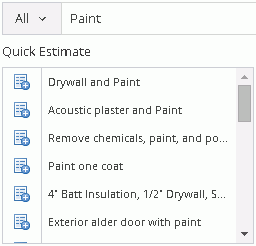
The Quick Estimate area of the Estimate window is populated with the results from either a Hotspot selection or a keyword that was entered in the Estimate Search field. The Quick Estimate contains the quick estimate sets that relate to the search area or word that was selected.
For the above image, “Paint” is the keyword in the Estimate Search and the items showing in the Quick Estimate area are the quick estimates that relate to paint. Quick estimates contain one or more line items that can be added to the estimate all at one time. To see what line items a quick estimate contains, click on the name, and the items contained in that quick estimate will be displayed in grid to the right of the Quick Estimate grid.
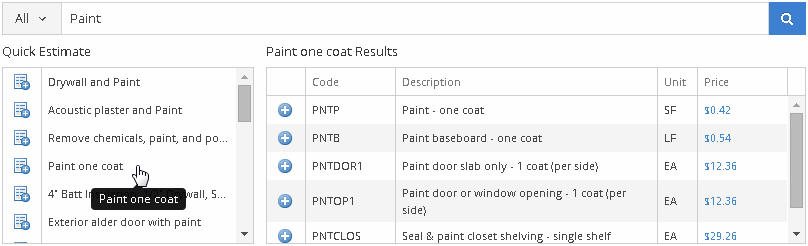
For the above image, the Paint
one coat quick estimate contains several line items that are now
listed under Paint one coat Results.
To add all of the line items that a quick estimate contains, click on
the  icon
adjacent to that quick estimate, and those line items will all be added
to Added Items area below the
Quick Estimate area where the
quick estimate names are shown. Once the line items are added to the estimate
they can be edited by selecting anywhere on the line item that you wish
to edit.
icon
adjacent to that quick estimate, and those line items will all be added
to Added Items area below the
Quick Estimate area where the
quick estimate names are shown. Once the line items are added to the estimate
they can be edited by selecting anywhere on the line item that you wish
to edit.
For Technical Support please call 1-800-710-9228 or click here to access our live chat service.
Copyright 2004-2018 Xactware Solutions, Inc. All rights reserved.