 .
. Preferences – Transaction Detail
In this Topic Hide
To see a video help for this topic, click
.
Transaction Detail is the area where a user can keep track of the Purchased Transactions and the projects billed towards those transactions. From this screen you can see how many projects have been billed in any given month and/or year, as well as the project information for those projects. The Transaction Detail tab is located under the Preferences on the main dashboard of XactPRM.

In the Purchased Transactions section, you can see a snapshot of the number of pre-paid transactions that have been purchased, when they were purchased, how many have been used, and when that set of pre-paid transactions expires. This table is the same table shown at the bottom of the Dashboard (see Dashboard help).

In the upper right corner of this section you will find the Show Expired Transactions check box. Click this to switch between viewing expired transactions and hiding expired transactions. By default, the expired transactions are hidden.
Underneath the Purchased Transactions section is the Projects Billed table. The projects are filtered by month and year. You can select the month and year of the projects that you want to see in the upper right corner of this section. Each project is accompanied by its Billing Type, Project Type, File Number, Instance, Org Unit, Profile, and Created date.
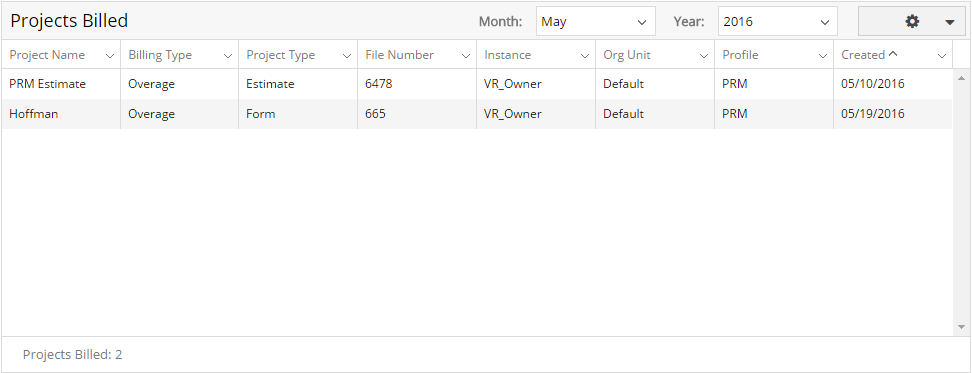
To export the Projects
Billed table to Excel, click the options cog  to open the dropdown and select Export
to Excel.
to open the dropdown and select Export
to Excel.
For Technical Support please call 1-800-710-9228 or click here to access our live chat service.
Copyright 2004-2018 Xactware Solutions, Inc. All rights reserved.